
PLC Bridge
Put Live Vorne XL Production Data on the Plant Controller, and Let the Controller Talk Back, Over the Protocol It Already Speaks.

The Line's Own Numbers, on the Rung
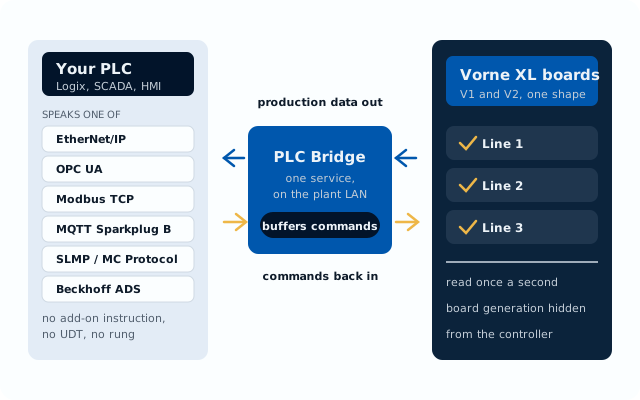
One service on the plant network, between your controller and every Vorne XL board on the floor
Named the Way Your Program Is
Any point or command can carry the name your program already uses. The rename list is a whitelist as well: what it does not name is not reachable.
Both Directions
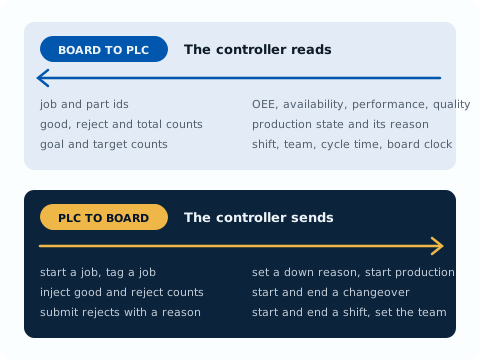
The controller reads live job, part, shift, count, state, and OEE values, and sends job, reason, count, and shift commands back to the board.
No PLC-Side Vendor Code
No add-on instruction, no AOI, no UDT, no firmware option, and no rung to import. Your integrator creates tags with the names and types we hand over.
Buffered, and Replayed in Order
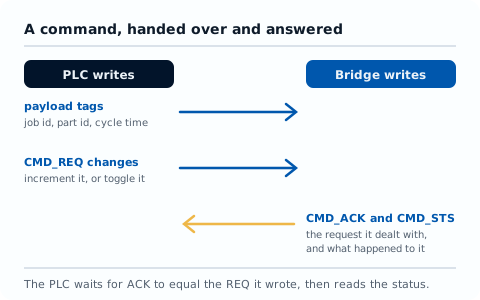
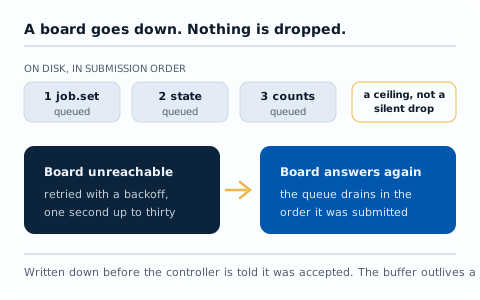
A command is written to disk before it is acknowledged and carried out strictly in order. A board that was down drains its queue when it comes back.
Quality on Every Value
Each point says whether it is fresh, held after a failed read, or something the board does not provide. A missing number is never written as a zero.
A Failed Command Is Never Silent
A command the board refuses is recorded as failed, counted in the status answer, and left for audit, with the reason named. It never blocks the ones behind it.
The Two Halves of the Job
How a command is handed over, and what happens to it while a board is down
Your Controller, Talking
to Your Vorne Boards
Vorne XL boards already measure the line. PLC Bridge puts those numbers where the machine's own controller can act on them, and lets the controller tell the board what is happening, without anyone standing at a terminal.
However Your Controller Prefers to Talk
Six protocols on the controller side, one tag model behind all of them
EtherNet/IP
Allen-Bradley, over explicit messaging. Every value lands in a named controller tag.
OPC UA
A server your SCADA or historian browses, reads, and writes. Ignition, FactoryTalk, and PI need nothing more.
Modbus TCP
One fixed register map, served either way round: the bridge listens, or it connects out and mirrors the map.
MQTT Sparkplug B
An edge node on your broker, so a board lands in your unified namespace. Births, data on change, commands as DCMD.
SLMP / MC Protocol
Native Mitsubishi. MELSEC device memory over SLMP on the CPU Ethernet port - no Modbus gateway, no conversion in the program.
Beckhoff ADS
Native TwinCAT. Variables by symbol name over ADS, in the PLC's own variables. Needs an ADS route; ADS is part of the runtime.
One Bridge, Many Boards
A single bridge serves several boards and several controllers at once. Each connection names the board, the points, and the commands it may send.
It Knows the Controller
Where the protocol carries reliable identity the bridge reads it and configures itself: CIP on Allen-Bradley, the SLMP model on MELSEC, ADS device info on TwinCAT. Where it does not - plain Modbus TCP - you name the vendor and model and the bridge loads that profile instead. Profiles carry the vendor's own data types, arrays and structures, byte and word order, rate and batch limits, register and device maps, and setup and licensing.
It Never Leaves the Plant
The bridge talks to boards and controllers on the local network and nowhere else. Board logins are redacted from logs.
V1 and V2 Look the Same
The bridge hides the board generation, so one controller program serves a mixed fleet and an upgraded line needs no change on the PLC side.
Which Controllers That Means
We speak protocols and you buy a brand, so here is the translation.
Rockwell Automation, Allen-Bradley - EtherNet/IP - ControlLogix, CompactLogix and Micro800. Named controller tags both ways. Base tags only: no AOI, no UDT, no rung. CIP identity loads that family profile.
Siemens - Modbus TCP - S7-1200 and S7-1500. MB_CLIENT polls; MB_SERVER takes writes. No extra hardware. Model named in config; its profile brings the register map and word order.
Mitsubishi Electric - SLMP / MC Protocol - MELSEC iQ-R and iQ-F on the CPU Ethernet port. Device memory direct, no Modbus gateway. CPU model loads the profile. Modbus TCP remains on the iQ-F if preferred.
Omron - Modbus TCP - NJ and NX series. Built-in Ethernet with ModbusTCPRead, ModbusTCPWrite and ModbusTCPCmd. Name the model; the profile does the rest.
Schneider Electric - Modbus TCP - Modicon M241, M251 and M580. Client and server in firmware. READ_VAR polls the bridge, or the embedded server takes its writes.
Beckhoff - ADS - TwinCAT 3 by symbol name over ADS. Device info loads the TwinCAT profile. Needs an ADS route. OPC UA (TF6100) and Modbus TCP (TF6250) remain as licensed functions; ADS is part of the runtime.
Modbus TCP runs either way round; writing into the controller needs 6239 contiguous holding registers it can read and write. That is a Modbus-only condition for Siemens, Schneider and Omron, and for Mitsubishi or Beckhoff only on their secondary Modbus route rather than SLMP or ADS. Omron documents the master function, so on an NJ or NX the controller does the polling. EtherNet/IP here means Allen-Bradley CIP tag access. The bridge runs the OPC UA server, so that side must be an OPC UA client. Sparkplug B: the bridge is the edge node and the other side is a Sparkplug host application, not a controller function. Beside the controller: Ignition, FactoryTalk and PI as OPC UA clients, HiveMQ as the MQTT broker, and Studio 5000 for the tag import. Vorne XL V1 and V2 are the boards the bridge reads.
One Service on the Plant Network
PLC Bridge runs as a container on the plant server, deployed through Client Manager as one more service in the app suite beside Sync Bridge. Sync Bridge keeps bringing Vorne data into the suite for Pulse, Explorer, and the rest; the bridge is a sibling that serves the controller instead. It talks to boards and controllers on the local network, and nowhere else.
One configuration document declares everything: how often boards are read, which boards to read, and which controller connections to serve. Each connection names its protocol, the board it sees, the points it is allowed to read, the names it knows them by, and the commands it may send. Nothing is guessed, and nothing is invented.
Deployed by Client Manager
The same control plane that deploys the rest of the suite, with its own configuration volume and a buffer volume that outlives the container, so a restart never loses a command the controller was told had been accepted.
A Tag List for Your Integrator
Generated from the site's own configuration: exactly the tags, nodes, registers, or metrics to create, at the types the protocol needs. On a Logix controller they are controller-scope base tags, and the list imports into Studio 5000 as a CSV.
Status Before the Line Notices
Health and status endpoints in the same shape Sync Bridge serves, reporting every board, every controller connection, and the command buffer. A connection with one bad tag is degraded and keeps serving the rest.
The OEE IntelliSuite Ecosystem
The controller acts on the data. The suite is where everyone else reads it.
OEE Pulse
The same boards feed the live timeline, the alert engine, and the shift reports, so the floor and the controller are reading one production record.
OEE Explorer
Historical OEE, downtime, and quality analysis on the same board data the controller is acting on, with trend, drill-down, and cross-device comparison.
Work Tracker
A job the controller started, and a reason it set, land in the operator's record with the employee and shift context around them.
OEE Costing
The stops the controller reacted to also carry a dollar value, so a line's downtime shows up in cost rather than only in minutes.
A full guided demo on your own production data is available on request.