
OEE Data Converter
Keep Every Year of Production History, and Give Your V1 Boards the V2 Features They Were Never Built For.

Two Generations, One Set of Numbers
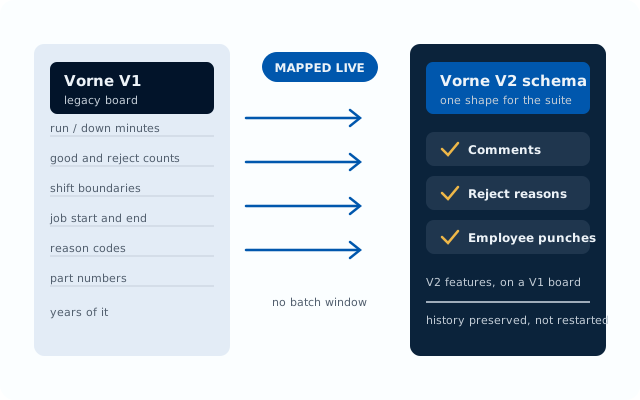
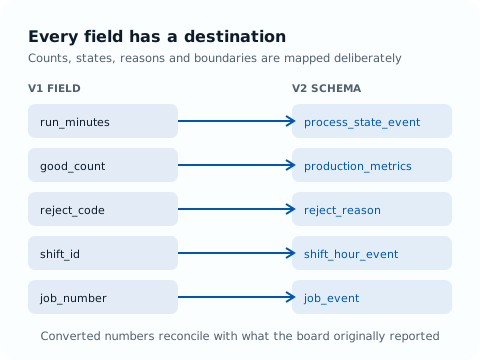
The Converter maps V1 production data into the V2 schema, so everything downstream stops caring which board it came from
Conversion On the Fly
V1 data is converted as it arrives, not in an overnight batch. A V1 line shows up in the same dashboards, in the same shapes, as the V2 line beside it.
V2 Features on V1 Boards
Once converted, a V1 board carries the things it never had on its own: operator comments, reject reasons, and employee punch-ins.
Your History Comes With You
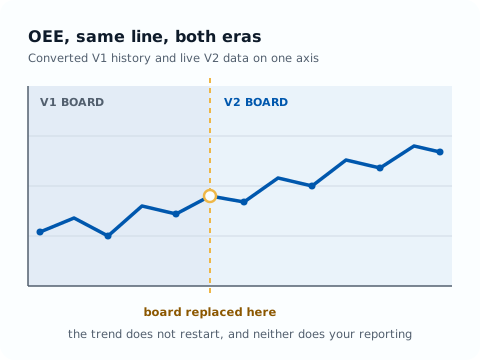
Years of V1 production data land in the V2 schema intact, so upgrading a board does not draw a line through your records.
Year-Over-Year Analytics
Compare this quarter against the same quarter two boards ago. In Explorer, converted history and live V2 data sit on the same axis.
Data Integrity Preserved
Counts, states, reasons, shifts, and job boundaries are mapped deliberately, so the converted numbers reconcile with what the board originally reported.
Upgrade at Your Own Pace
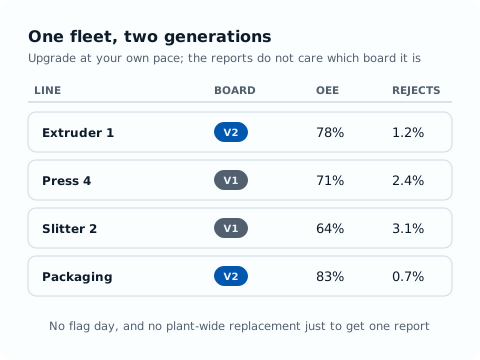
Run a mixed fleet for as long as you need. There is no flag day, and no plant-wide board replacement just to get one report.
One Timeline, Whatever the Hardware
Converted V1 history and live V2 data, analyzed together in Explorer
Bridge Your
Production History
Upgrading to V2 boards usually means starting your data over. The Converter maps your V1 data into the V2 schema instead, so the history you spent years accumulating stays accessible and comparable, and the boards you have not replaced yet still take part in the modern suite.
Comments on a V1 Line
Operators annotate stops and events on converted V1 devices exactly as they do on V2, and the notes land in the same Comments Report.
Reject Reasons That Report
Reject codes on converted devices feed the same quality analysis, so scrap is broken down by reason across the whole plant, not just the new lines.
Employee Punch-Ins
With Work Tracker, operators punch in on converted V1 devices, so labor tracking and employee dashboards cover the whole floor.
Reports That Do Not Have a Seam
Shift summaries, OEE trends, and top-loss reports span both generations, so nobody has to remember which line changed hardware in which month.
What Your Converted Data Unlocks
Once V1 data speaks V2, the rest of the suite simply works
OEE Explorer
Converted history and live data on one axis, for year-over-year OEE, downtime, and quality analysis across the whole fleet.
Pulse and Work Tracker
Converted devices appear on the live timeline, raise the same alerts, and accept comments, reject reasons, and employee punches.
A full guided demo on your own production data is available on request.